
2025 was a record-breaking year for ransomware attacks, with incidents increasing by 45% over the past year alone. U.S.-based small and mid-sized manufacturers were hit especially hard, particularly those in general manufacturing and machinery sectors. In fact, 41% of IT and cybersecurity professionals report heightened anxiety and stress about future attacks.

Given this landscape, it is no surprise that cybersecurity is top of mind for many of our customers. Based on the questions we have been receiving, we decided to dedicate this Q&A blog to addressing some of the most common security concerns and clarifying how to protect industrial environments more effectively.
Q: With cybersecurity top of mind across the industry, are there any recent Microsoft Windows security updates that ADISRA SmartView users should be aware of?
In 2025 and beyond, Microsoft Windows remains the dominant operating system in industrial automation. It continues to power the vast majority of Human Machine Interfaces (HMIs), SCADA systems, engineering workstations, and many edge and industrial PCs deployed across manufacturing, energy, water/wastewater, and infrastructure environments.
Although support for Windows 10 ended in October 2025, the ecosystem is actively transitioning to Windows 11 IoT Enterprise and Windows Server 2025. We want to inform our customers about important security updates that may affect industrial systems.
Microsoft Secure Boot certificates originally issued in 2011 begin expiring in June 2026. Microsoft is deploying updated 2023 certificates to maintain protection against emerging boot-level threats. While most systems will receive these updates automatically, some industrial or embedded devices may require OEM firmware updates to apply the new certificates correctly.
Secure Boot is a critical protection mechanism that ensures devices start with only trusted, cryptographically verified software. It protects the earliest stage of the boot process, before Windows even loads, from rootkits and boot-level malware.
If updated certificates are not installed:
- Systems will continue to boot and operate normally.
- Standard Windows updates will still install.
- However, the device will no longer receive new protections for the early boot process, including updates to the Boot Manager, Secure Boot databases, and revocation lists.
For industrial environments that prioritize long equipment lifecycles, this is particularly important. Systems that are not properly updated could become increasingly exposed to low-level threats over time.
Additional Windows Vulnerabilities to Be Aware Of
Cyber threats continue to evolve, and Microsoft regularly patches vulnerabilities affecting core Windows components. Two notable categories include:
1. Windows Shell Security Feature Bypass Vulnerabilities
The Windows Shell (Explorer) provides the graphical interface, including the taskbar, desktop, Start menu, and file-handling mechanisms. Certain vulnerabilities have allowed attackers to bypass Windows SmartScreen and other security controls if a user is tricked into interacting with a malicious file or shortcut.
In these cases, an attacker must convince a user to open or interact with a specially crafted file. Once executed, malicious code could run without the typical warning prompts.
This highlights an important reality for industrial systems: social engineering and phishing remain major risk vectors, especially when engineering workstations have internet access.
2. MSHTML (Trident) Framework Vulnerabilities
Microsoft’s MSHTML framework, also known as the Trident rendering engine, is deeply integrated into Windows. Originally developed for Internet Explorer, it remains embedded in modern Windows versions (including Windows 11) for backward compatibility and IE Mode in Microsoft Edge.
Because of its deep integration and legacy footprint, MSHTML continues to be a frequent target for exploits.
Attackers may attempt to:
– Trick users into opening specially crafted HTML files
– Exploit shortcut links or rendering behavior
– Cause the system to execute content as code instead of data
Microsoft continues to issue patches for these vulnerabilities, but systems that are not regularly updated remain at risk.
Because ADISRA SmartView runs on Microsoft Windows platforms, system security depends on maintaining current operating system updates, firmware updates, and cybersecurity best practices.
We strongly recommend that customers:
- Verify Secure Boot certificate updates are applied
- Coordinate with OEM hardware providers for firmware updates
- Maintain current Windows security patches
- Follow proper IT/OT network segmentation guidelines
Industrial software is only as secure as the operating system and hardware that support it. Proactive updates help ensure long-term reliability and protection.
Q: How is user “inactivity” defined in ADISRA SmartView’s security settings? Does inactivity mean no mouse movement, no clicks on objects, or no interaction at all? If a user is simply viewing a graphic screen without actively clicking or entering data, will the system consider that inactive and automatically log them out?
Pressing the Settings button opens the Security Settings window, where administrators can configure security rules for users who connect to the project’s runtime environment. This includes settings that apply to Viewers, password policies for users defined in the Users & Profiles window, and other configurable security parameters.
Within these settings, you can define automatic logout behavior based on user inactivity.
In ADISRA SmartView, inactivity is measured by the lack of user interface activity, including mouse movement. When the mouse stops moving, the inactivity timer begins counting. If no activity occurs within the configured timeout period, the user can be automatically logged out.
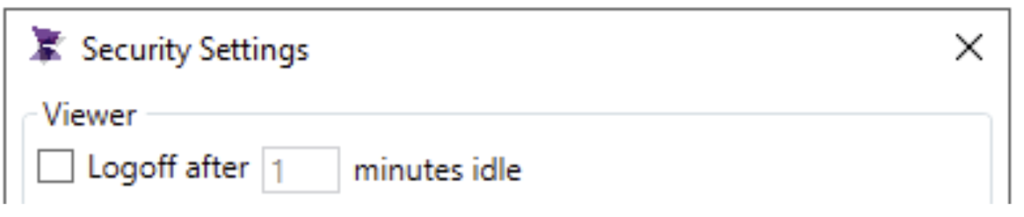
The system tag @InactiveTime provides visibility into this process by displaying the current inactivity counter value in real time.
Q: Does ADISRA SmartView support both encryption at rest (such as Transparent Data Encryption in SQL Server or MySQL) and encryption in transit (SSL/TLS), and if so, can SSL/TLS parameters like “Encrypt” and “TrustServerCertificate” be configured in the database connection settings?
Yes. ADISRA SmartView supports both encryption at rest and encryption in transit, provided these features are enabled and configured at the database level.
Encryption at Rest
Encryption at rest, such as Transparent Data Encryption (TDE) in Microsoft SQL Server or InnoDB encryption in MySQL, is managed entirely by the database server. Since this encryption is transparent to the client application, no special configuration is required within ADISRA SmartView. The connection string remains unchanged.
Encryption in Transit (SSL/TLS)
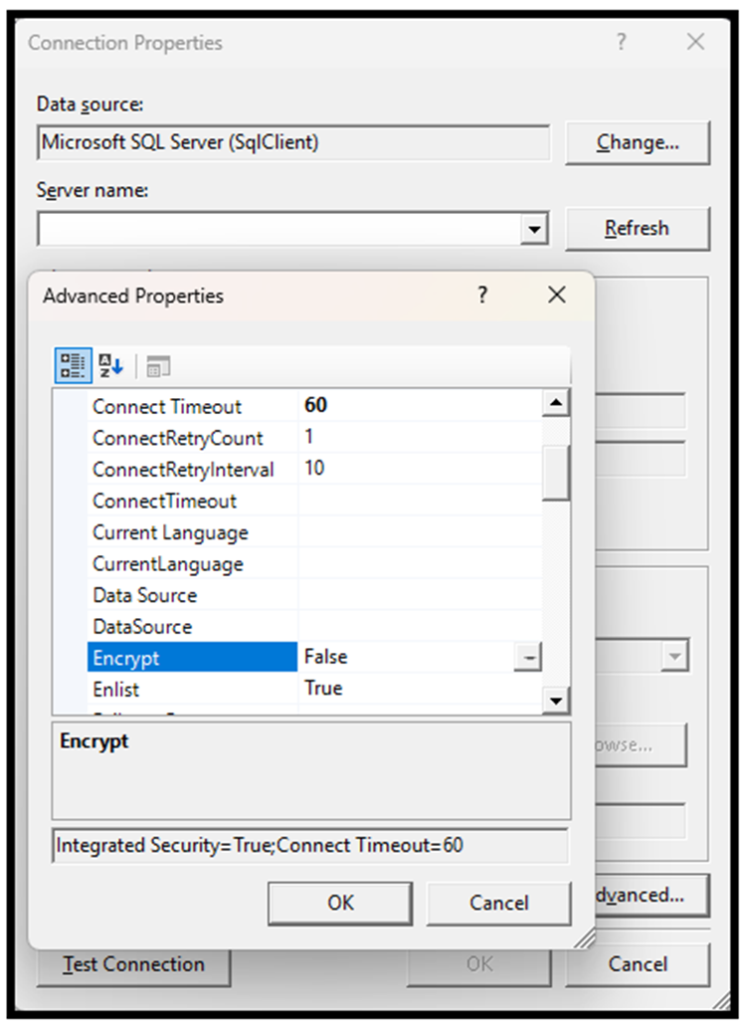
For encryption in transit, ADISRA SmartView allows you to configure SSL/TLS parameters directly in the database connection settings.
When configuring a database connection, you can click the Advanced button to manually modify the connection string. Here, you may add parameters such as:
- Encrypt=true
- TrustServerCertificate=true or TrustServerCertificate=false
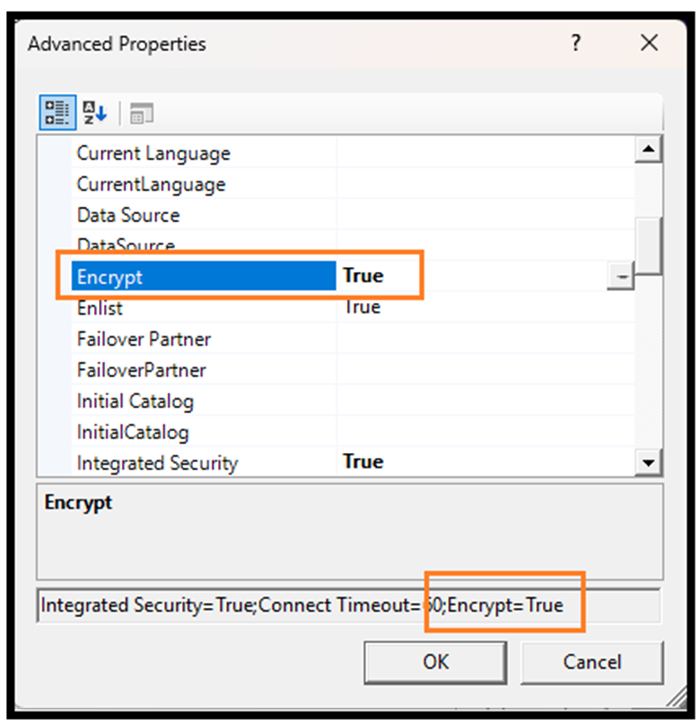
Configuration behavior:
- If Encrypt=true and TrustServerCertificate=true are set, the connection is encrypted, but certificate validation is not enforced.
- If Encrypt=true and TrustServerCertificate=false are set, the SQL client relies on the operating system’s certificate store. In this case:
- The SQL Server must be configured with a valid SSL certificate.
- The client machine must trust the certificate authority (CA) that issued the certificate.
This approach gives users the flexibility to align database security with their organization’s cybersecurity policies and compliance requirements.
Q: Can ADISRA SmartView enforce controlled access and signature authorization in a closed system?
Yes. ADISRA SmartView supports the implementation of a “closed system” as defined in 21 C.F.R. Part 11, where access is restricted to authorized individuals responsible for electronic records.
Security can be implemented using:
– The built-in ADISRA SmartView security system
– Integration with an LDAP domain security server
Key controls include:
– Unique user names and passwords
– Profile-based permissions (who can act vs. who can e-sign)
– Configurable password policies
– Automatic logoff after inactivity
– Lockout after repeated failed login attempts
– Logoff after failed e-sign attempts
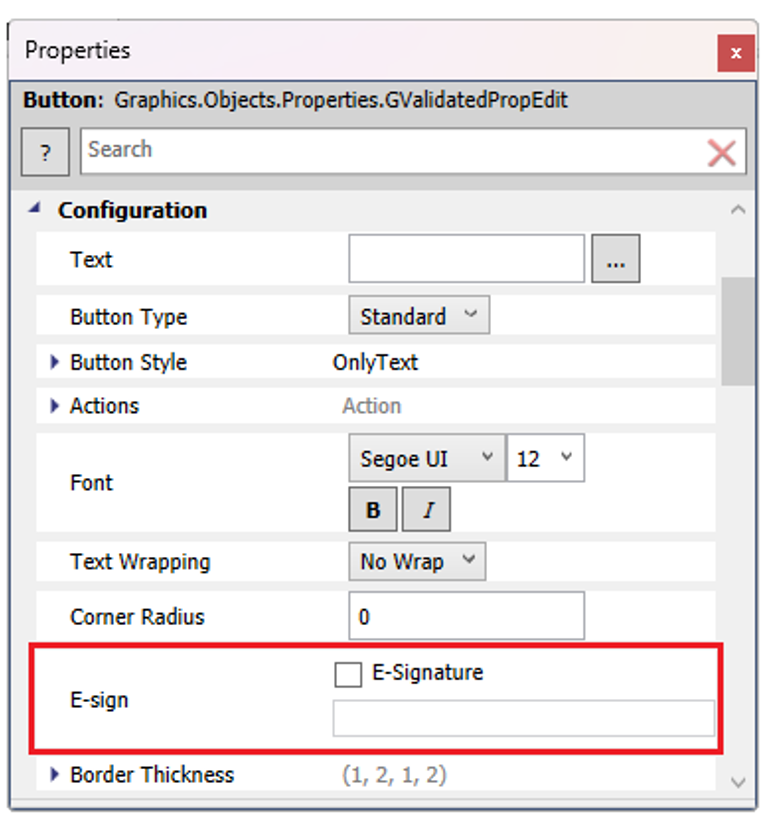
CheckBox: This option enables or disables the requirement for an electronic signature before the object can be interacted with or its action executed.
Importantly, object-level security allows you to define:
– Who can perform an action?
– Who is authorized to electronically sign that action?
This separation of duties supports strong internal controls and aligns with FDA 21 C.F.R. Part 11, Subparts B (Controls for Closed Systems) and C (Electronic Signatures).
For more information on ADISRA’s FDA 21 CFR Part 11 capabilities, please review the two documents linked below.
Conclusion
Cybersecurity is no longer a background IT issue; it is a core operational requirement for industrial organizations. From Secure Boot certificate updates and Windows patch management to database encryption and FDA 21 C.F.R. Part 11 controls, today’s HMI/SCADA environments must be designed and maintained with security in mind.
ADISRA SmartView provides built-in capabilities to support secure architecture, controlled access, electronic signatures, and encrypted database connectivity. However, true protection requires a partnership between software, operating systems, hardware vendors, and IT/OT policies.
Industrial software is only as secure as the ecosystem surrounding it. Proactive updates, proper configuration, and disciplined security practices are essential to protecting uptime, compliance, and operational integrity.
We are committed to helping our customers build secure, scalable, and compliant industrial systems.
You can download ADISRA SmartView here.
If you would like to schedule a private demo with ADISRA to discuss your specific requirements, please click here.
If you have any specific questions or would like to speak with our team directly, please email us at info@adisra.com.
And do not forget to attend our upcoming webinar on February 26th at 9:30 AM CST. A description of the webinar and the registration link are provided below.
Smarter HMI/SCADA Applications by Design: Reusable Templates and Run-Time Configuration
Most HMI/SCADA projects succeed, or fail, before the first screen is ever built.
Early architectural decisions determine how well a system scales, how consistent it is for operators, and how difficult it becomes to maintain over time. In this webinar, you will see how template-driven design transforms HMI/SCADA into a flexible, reusable architecture rather than a one-off project.
Learn how reusable templates, runtime configuration, and low-code techniques dramatically reduce engineering effort while enabling systems that adapt to changing requirements.
Through a live walkthrough using ADISRA SmartView, we will show how templates encapsulate graphics, data bindings, and behavior into reusable components, and how they can be deployed, configured, and even modified at run time without returning to design mode.
Join us on February 26th, 2026, at 9:30 CST to discover how template-driven design creates scalable, maintainable, and future-ready HMI/SCADA applications.
Date: Thursday, 26 February 2026 – Please note the new date!
Time: 9:30 a.m. CST
10:30 a.m. COT
3:30 p.m. UTC/GMT
4:30 p.m. CET
5:30 p.m. EET & SAST
10:30 p.m. WIB (Jakarta)
11:30 p.m. MYT
You can register for the webinar here.
Please reserve your spot and join us live. We look forward to seeing you!
ADISRA®, ADISRA’S logo, InsightView®, and KnowledgeView® are registered trademarks of ADISRA, LLC.