
Great Tools Help People Achieve Great Results
In industrial automation, great design is about much more than creating attractive screens. The true value of a software platform lies in how effectively it helps engineers, operators, and developers transform ideas into reliable, efficient, and maintainable solutions. The best tools remove obstacles, simplify complex tasks, and allow users to focus on solving operational challenges rather than fighting with technology. When software is designed to work with the user, productivity increases, development time decreases, and better results follow.
This philosophy aligns closely with the principles of modern HMI design promoted by ISA-101, the industry standard for effective operator interfaces. ISA-101 emphasizes that an HMI should do more than display data; it should provide meaningful information that helps operators make better decisions. The primary goals are simple but powerful: transform raw data into actionable information and draw attention to the most important information at the right time. By focusing on clarity, consistency, and situational awareness, well-designed HMIs enable operators to identify abnormal conditions faster, understand process performance more easily, and respond confidently to changing conditions.
Achieving these goals requires more than good graphics. It requires development tools that make it easy to build intuitive, scalable, and maintainable applications. That is where ADISRA SmartView excels. Designed with productivity at its core, ADISRA SmartView provides advanced features that help developers create professional HMI and SCADA applications faster while following many of the best practices that define modern HMI design. In this blog, we will explore several of those features and show how they can help you design like a pro.
Build Once, Reuse Everywhere with Templates
One of the most effective ways to improve productivity and consistency in modern HMI/SCADA development is to use templates. Rather than creating each object from scratch, developers can build reusable templates for common equipment such as pumps, motors, valves, tanks, conveyors, and other process assets. These templates can include graphics, animations, alarms, scripts, navigation, and predefined operational behavior.
By creating a template once and reusing it throughout an application, engineers can dramatically reduce development time while ensuring a consistent user experience across the entire system. Instead of repeatedly configuring similar objects, developers instantiate the template and connect it to the appropriate tags or data sources.
Templates also provide significant long-term maintenance benefits. As applications evolve, changes can be made to the master template and automatically propagated to every instance, eliminating the need to update dozens or even hundreds of individual objects manually. This approach not only saves time but also reduces the risk of inconsistencies and engineering errors.
For organizations looking to scale projects across multiple machines, production lines, or facilities, templates provide a foundation for standardization. The result is HMI and SCADA applications that are faster to develop, easier to maintain, more scalable, and more consistent from project to project.
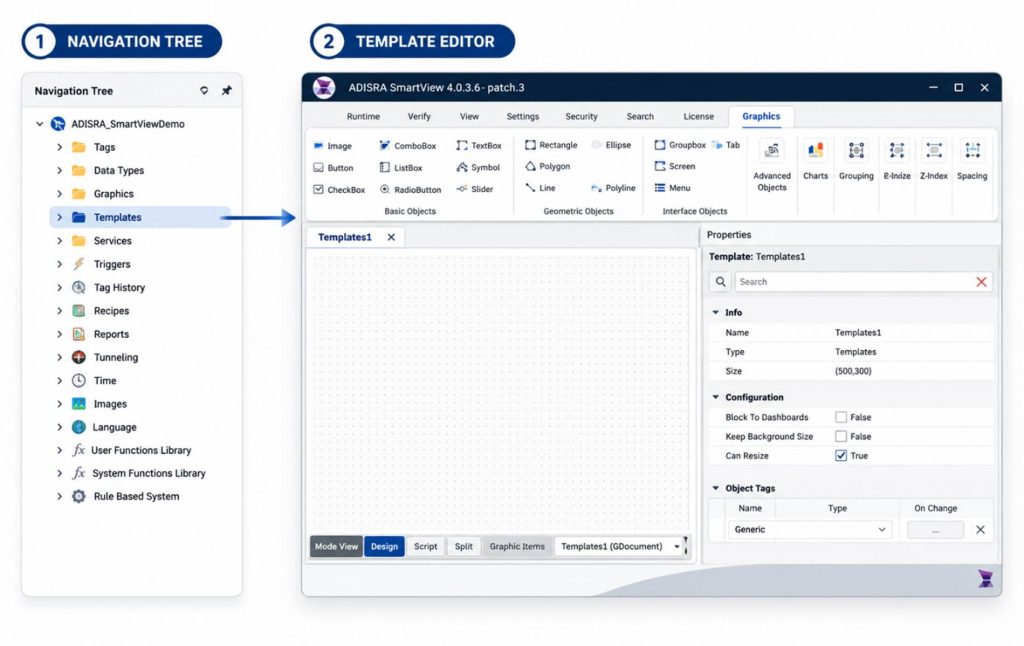
The Template Document functions much like a Graphic Document, allowing users to create and configure objects that can be reused throughout an application. The primary difference is that template objects cannot be nested within another template document.
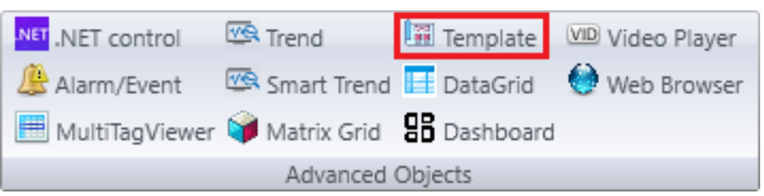
Once a template has been created, the Template Object can be used to place either a system template or a custom template from the Templates Document onto any graphic screen. During configuration, users can define and map Object Tags, enabling each template instance to operate independently while maintaining a consistent appearance and behavior.
This approach allows developers to create reusable components that encapsulate graphics, animations, alarms, scripts, and other functionality, significantly reducing development time while improving consistency and maintainability across the entire application.
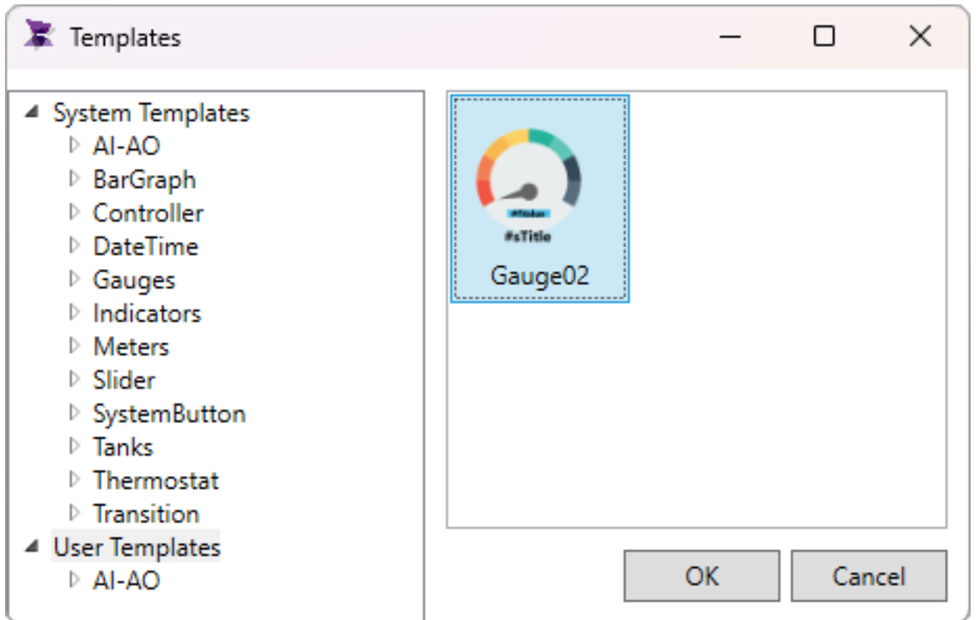
System Templates are pre-built, ready-to-use templates developed by the ADISRA engineering team to accelerate application development and simplify project configuration. Available through the System Templates Library, these templates provide a foundation for common industrial equipment and application functions, allowing users to quickly add proven graphics, behaviors, and functionality to their projects. By leveraging system templates, developers can reduce engineering effort, maintain consistency across their applications, and spend more time solving process challenges rather than building objects from scratch.
For additional information on templates and template-based development, explore our Animated Templates Whitepaper, Screen Templates Whitepaper, the Templates section of our website, and our accompanying video tutorial, which provide detailed guidance and best practices for building scalable, reusable applications.
Accelerate Graphic Development with Generative AI
The rise of Generative AI and AI Assistants is transforming the way engineers and developers create industrial applications. Millions of users now rely on AI-powered platforms every day to generate content, answer questions, create graphics, and improve productivity. According to industry data published by FatJoe, platforms such as ChatGPT, Gemini, Claude, DeepSeek, Grok, Perplexity, and Copilot collectively generate billions of monthly visits, highlighting the growing adoption of AI across nearly every industry.
| AI Platform | Monthly Visits |
| ChatGPT | 5.5 Billion |
| Gemini | 2.0+ Billion |
| Claude | 600 Million |
| DeepSeek | 450 Million |
| Grok | 326 Million |
| Perplexity | 187 Million |
| Copilot | 100 Million |
One practical application for HMI and SCADA developers is the rapid creation of custom graphics and visual assets. Instead of spending hours searching for images or manually creating graphics, developers can use an AI assistant to generate equipment illustrations, icons, symbols, backgrounds, and process-related graphics tailored to their specific application requirements. For example, a user can request an image of an industrial motor with a transparent background, generate the image in seconds, and then copy and paste it directly into an ADISRA SmartView Graphic Document or Template Document.
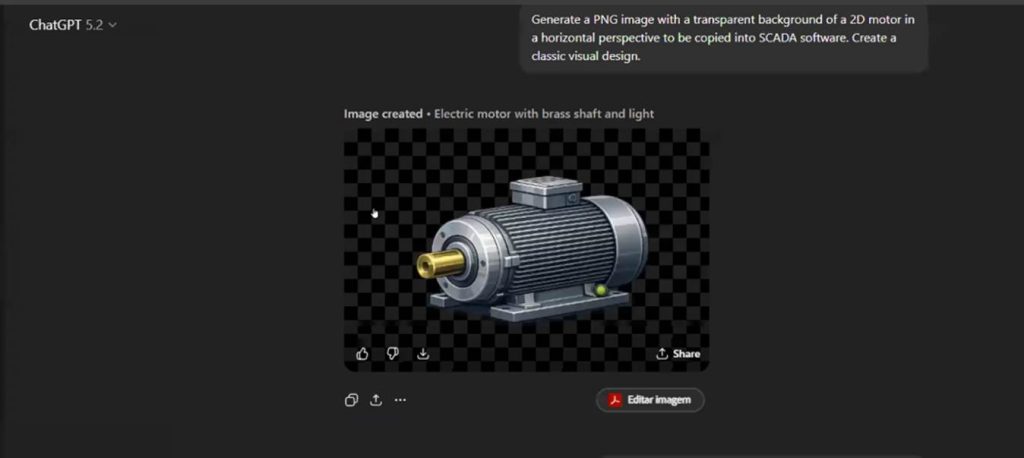
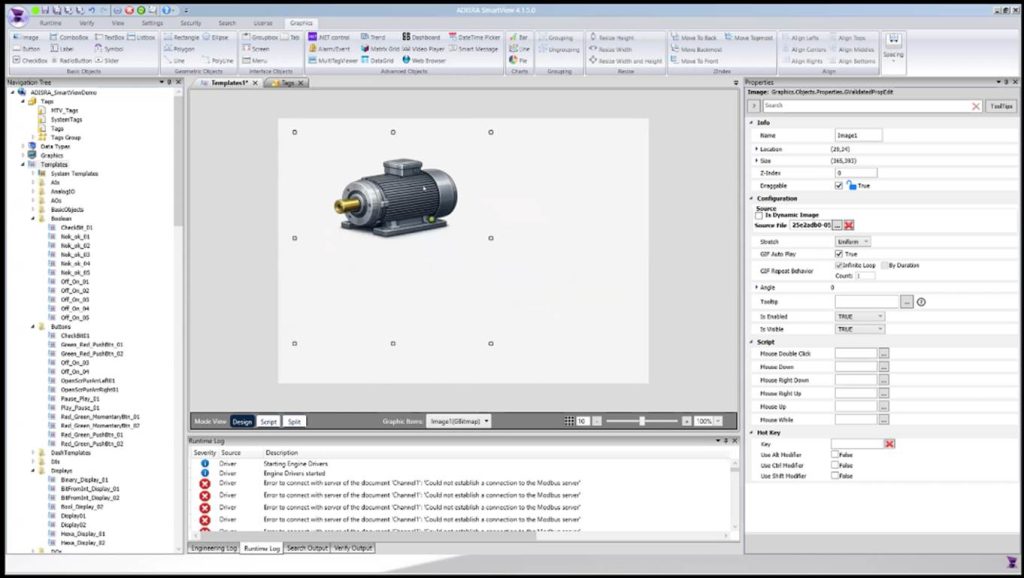
This capability enables developers to create more professional and visually appealing applications while significantly reducing development time. Combined with ADISRA SmartView’s support for reusable templates, AI-generated graphics can be incorporated into standard object libraries and reused across multiple projects. The result is a faster, more efficient design process that allows engineers to focus on application functionality and operator usability rather than graphic creation.
As Generative AI continues to evolve, it is becoming another powerful productivity tool that helps developers design smarter, build faster, and deliver more polished HMI and SCADA applications.
Accelerate Project Development with XML Import
One of the most powerful ways to improve productivity in HMI/SCADA development is through automated configuration using XML imports. XML (Extensible Markup Language) provides a standardized method for exchanging engineering data across software platforms, eliminating much of the manual work traditionally required to create tags, data structures, and device configurations.
In the ADISRA SmartView engineering environment, importing XML files is simple and straightforward. By right-clicking on the Data Types node within the Navigation Tree, users can import XML documents directly into their project. This capability allows engineers to quickly leverage existing PLC definitions and engineering data rather than manually recreating them within the HMI/SCADA application.
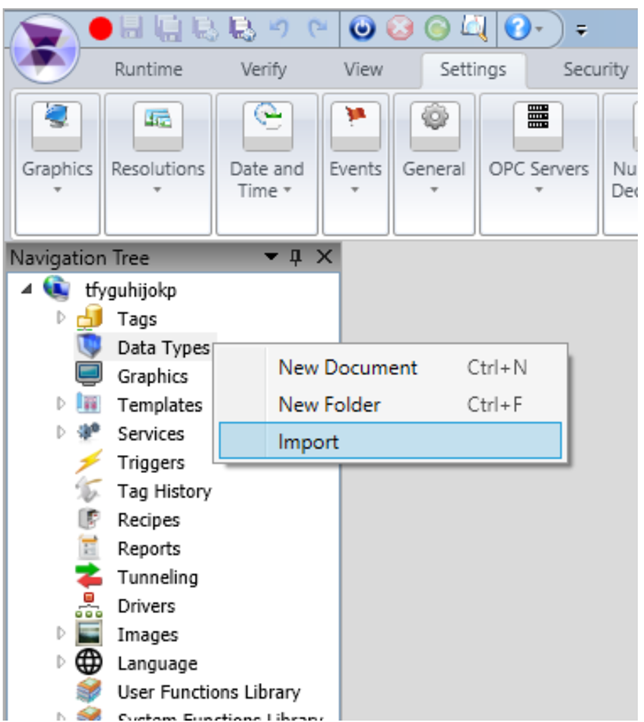
ADISRA SmartView supports XML files exported from PLC engineering tools that support XML, such as Next Engineering Programmable Logic Controller (PLC) and CODESYS-based platforms. By automatically importing data structures, variables, and user-defined data types, engineers can significantly reduce development time, improve consistency between control and visualization systems, and minimize configuration errors.
For projects with hundreds or even thousands of tags, XML import can save hours of engineering effort while ensuring that the HMI application remains synchronized with the PLC programming environment. The result is faster project deployment, improved accuracy, and a more efficient development workflow.
Build Faster with Reusable Functions
As HMI and SCADA applications become more sophisticated, productivity depends on more than graphics and templates. Developers also need efficient ways to implement logic, perform calculations, interact with databases, and automate repetitive tasks. ADISRA SmartView addresses this need through a powerful combination of built-in System Functions and customizable User Function Libraries.
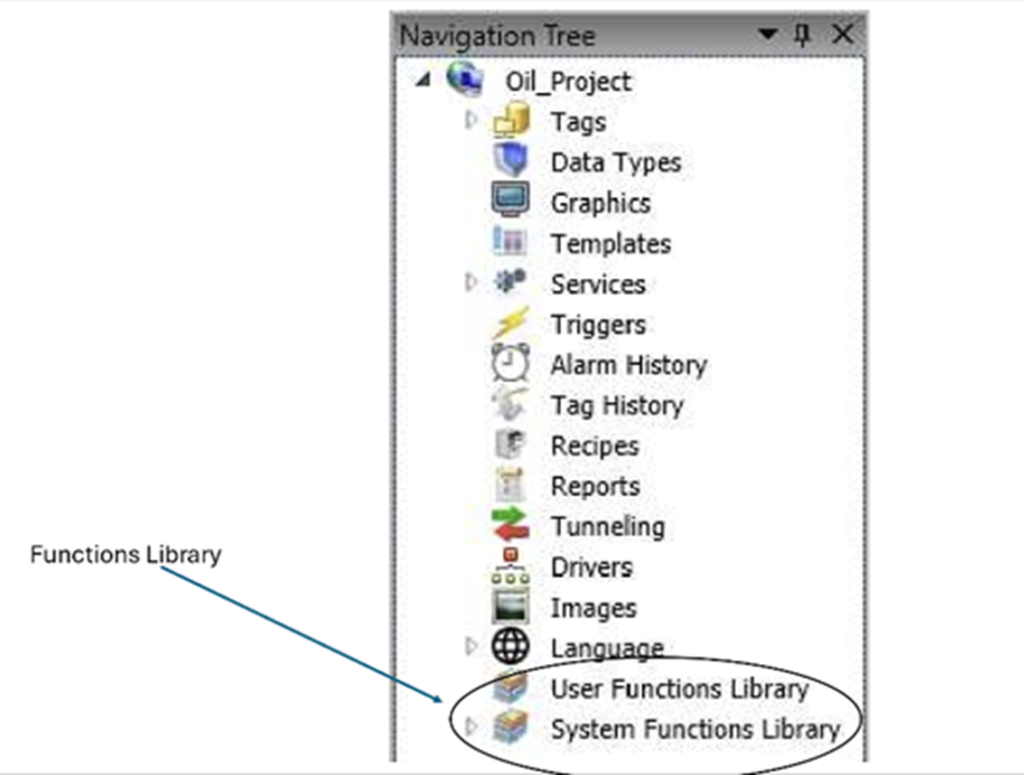
The System Functions Library provides a comprehensive collection of prebuilt functions ready to use throughout your application. These functions support a wide range of tasks, including database operations, data manipulation, file handling, communications, mathematical calculations, and system-level operations. Because these functions are built directly into ADISRA SmartView, they are thoroughly tested, standardized, and available throughout the development environment, allowing engineers to implement complex functionality quickly and confidently.
For even greater flexibility, ADISRA SmartView allows users to create their own User Function Libraries. Custom functions can be developed to encapsulate application-specific logic, calculations, workflows, or business rules, making code easier to maintain and reuse. Once created, these functions can be shared across multiple projects, helping organizations establish engineering standards and reduce development effort on future applications.
Together, the System Functions Library and User Function Libraries create a powerful framework for application development. Instead of repeatedly writing the same code, developers can leverage proven functions and reusable logic to accelerate project execution, improve consistency, and simplify long-term maintenance.
Whether you are developing a simple machine interface or a large-scale SCADA system, reusable functions help transform complex development tasks into manageable building blocks, allowing engineers to focus on delivering value rather than reinventing common functionality.
Want to learn more about leveraging Function Libraries in your applications? Check out the SVFunctions Overview Whitepaper, the SVFunctions Guide Whitepaper, and our video demonstration for a deeper look at how ADISRA SmartView helps developers create more powerful, scalable, and maintainable applications.
Experience ADISRA SmartView by downloading a software trial from our website here.
Design Like a Pro with ADISRA SmartView
The most successful HMI and SCADA projects are not necessarily built by the largest engineering teams or developed over the longest timelines. They are created by engineers who leverage the right tools to work smarter, standardize development, and maximize productivity. Modern HMI design principles, such as those promoted by ISA-101, emphasize transforming data into meaningful information and helping operators focus on what matters most. Achieving those goals requires a development environment that enables speed, consistency, scalability, and maintainability.
Throughout this blog, we have explored several ways ADISRA SmartView helps engineers design like a pro, from reusable templates and AI-assisted graphic creation to XML imports and powerful function libraries. These capabilities help eliminate repetitive tasks, reduce engineering effort, improve application consistency, and accelerate project deployment. The result is a development experience that allows you to focus more on solving operational challenges and less on the mechanics of application development.
As industrial automation systems continue to evolve, productivity is becoming one of the most important competitive advantages. Organizations that can develop, deploy, and maintain applications more efficiently will be better positioned to respond to changing business needs and deliver greater value to their customers.
Ready to Design Like a Pro?
Discover how ADISRA SmartView can help you build professional HMI and SCADA applications faster while improving consistency, scalability, and maintainability across your projects.
Download a free trial of ADISRA SmartView, schedule a personalized demonstration, or join one of our upcoming webinars to see these productivity-enhancing features in action.
Whether you are creating your first HMI application or managing enterprise-wide SCADA deployments, ADISRA SmartView provides the tools you need to transform ideas into intelligent, high-performance solutions.
Ready to accelerate your application development process? Join us for our upcoming webinar, “Unlock Rapid Application Development with ADISRA RapidView,” and discover how a no-code approach can help you create powerful HMI and monitoring applications in less time. See the registration information below.
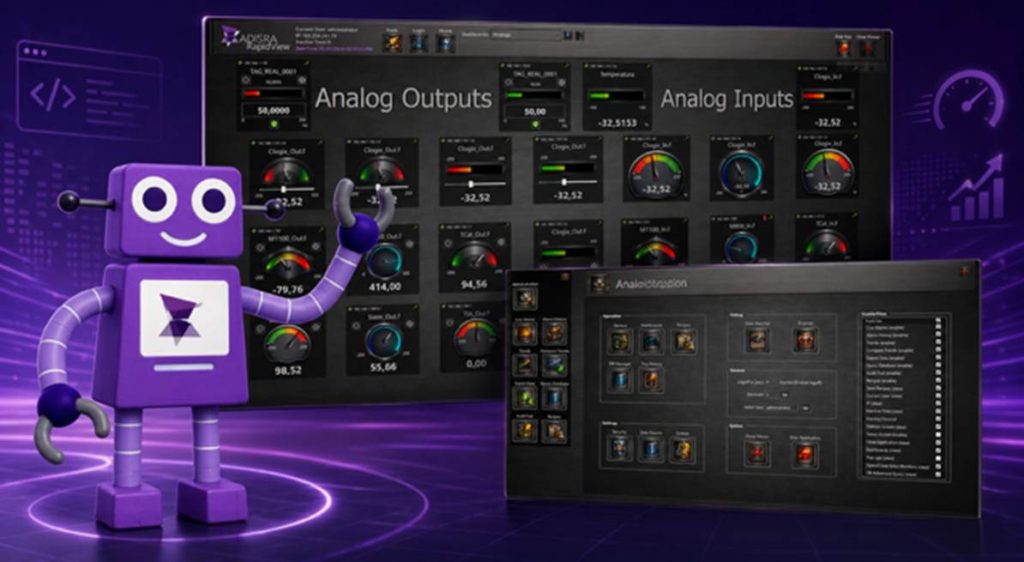
Unlock Rapid Application Development with ADISRA RapidView
Join us on June 11, 2026, as we unveil ADISRA RapidView. Discover our newest product and see how it can accelerate application development.
ADISRA RapidView is changing the way industrial applications are built and deployed. ADISRA RapidView is a powerful no-code environment designed to help users create HMI and monitoring applications quickly and efficiently, without the complexity of traditional development tools.
During this session, you will see how intuitive configuration tools, reusable components, and seamless access to real-time data enable users to develop professional applications in a fraction of the time. Whether you are creating operator interfaces, dashboards, or monitoring solutions, ADISRA RapidView simplifies the process from concept to deployment.
If you are looking for a faster, simpler approach to industrial application development, this webinar is for you.
Register today and learn how ADISRA RapidView can accelerate application development from concept to deployment.
ADISRA’s webinar is scheduled for June 11th, 2026
Global Time Zones – Start Time:
7:30 AM PDT
9:30 AM CDT (Austin, Texas) /COT
10:30 AM EDT
2:30 PM UTC (Universal Time Coordinated)
4:30 PM CEST/SAST
5:30 PM EEST
9:30 PM WIB
10:30 PM SGT
11:30 PM JST
Please select the link below and complete the registration form. We look forward to seeing you at the ADISAR RapidView Webinar on 11 June 2026!
To reserve your spot, click the registration link here.
ADISRA®, ADISRA’S logo, InsightView®, and KnowledgeView® are registered trademarks of ADISRA, LLC.
© 2026 ADISRA, LLC. All Rights Reserved.